Compliance
Compliance reads your register against the frameworks that apply to your organisation, tells you which evidence satisfies which control, and bundles the lot for an auditor.
- For
- Reads your register against applicable frameworks and bundles the evidence an auditor will ask for.
- Will not
- It does not send anything, make the breach determination, scan machines, or claim coverage it cannot show. Encryption state, classification and regulatory scope are fields you or an integration fill in.
- Writes
- It writes evidence reports, an audit evidence pack and audit samples to files you choose; nothing leaves the Mac.
What the portal is for
It answers one question: what will an auditor ask for, and do we have it.
The screen is headed Compliance Portal, with your organisation’s name under it. It is built from a profile: your industry, your jurisdiction, and the kinds of regulated data your machines handle. From that profile Manifest derives a programme, which is the frameworks that apply to you, the controls inside them, and the evidence reports that satisfy those controls. Everything else on the page is that programme, rendered.
Until a profile exists the portal shows one card, Set up your compliance profile, with a Start setup button. The same flow is reachable afterwards from Edit profile in the header, and re-running it re-derives the whole programme. A change of jurisdiction, or a new category of data landing on the fleet, is a profile edit rather than a rebuild.
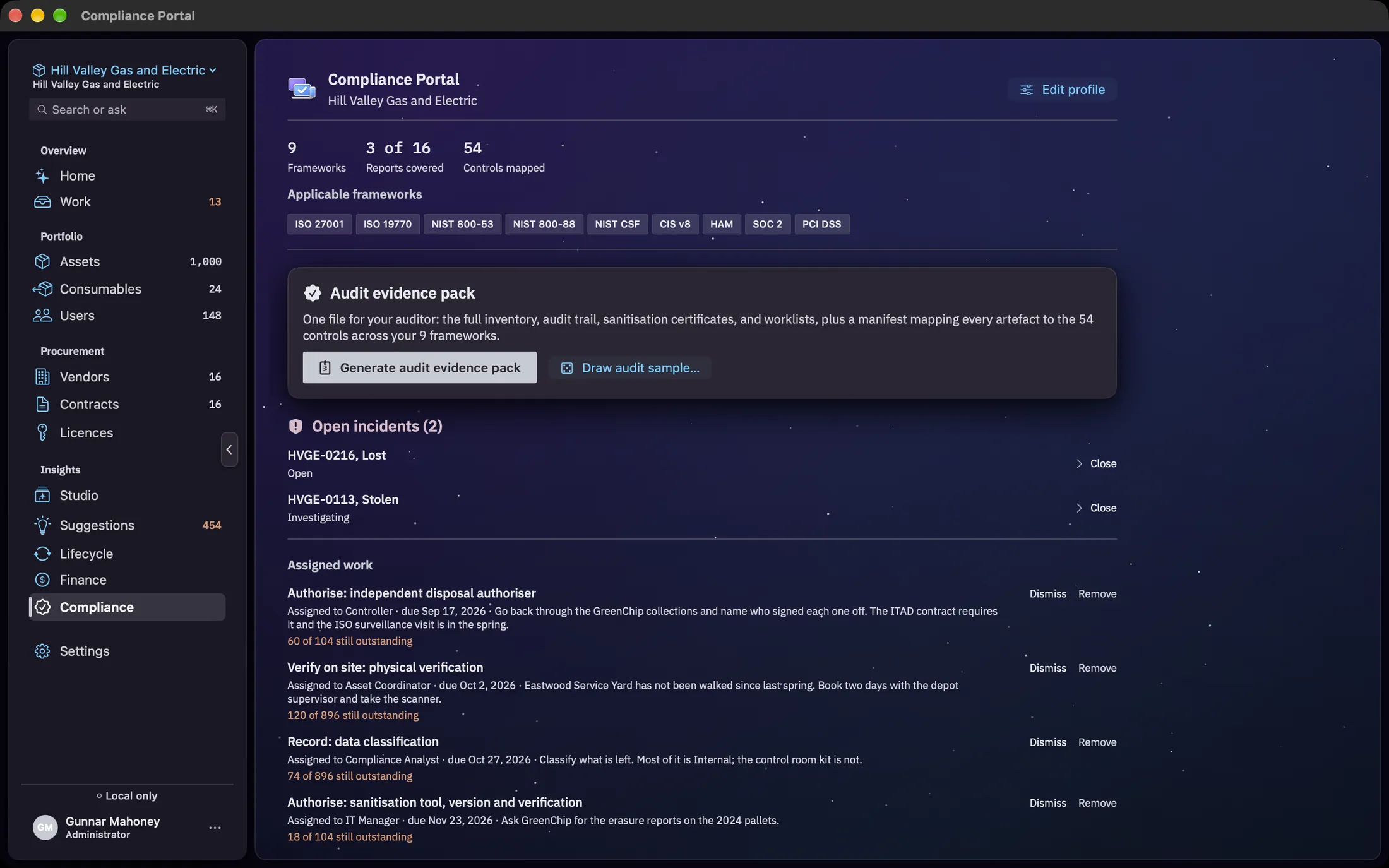
Twelve frameworks exist in the catalogue: ISO/IEC 27001:2022, ISO/IEC 19770-1, NIST SP 800-53 Rev 5, NIST SP 800-88 Rev 1, NIST CSF 2.0, CIS Controls v8, Hardware Asset Management (HAM), SOC 2, PCI DSS 4.0, the HIPAA Security Rule, GDPR and Sarbanes-Oxley. You will not see all twelve. The chips under Applicable frameworks are the ones your answers derived, and the three figures above them are how many that is (Frameworks), how many of the programme’s reports your evidence covers (Reports covered), and how many controls the reports map to (Controls mapped). A US technology company that takes card payments and holds EU personal data, and no health data, lands on six: the four every register gets, plus PCI DSS and GDPR.
The sixteen evidence reports
Each row in the list is a report you can produce on its own, without building the whole pack.
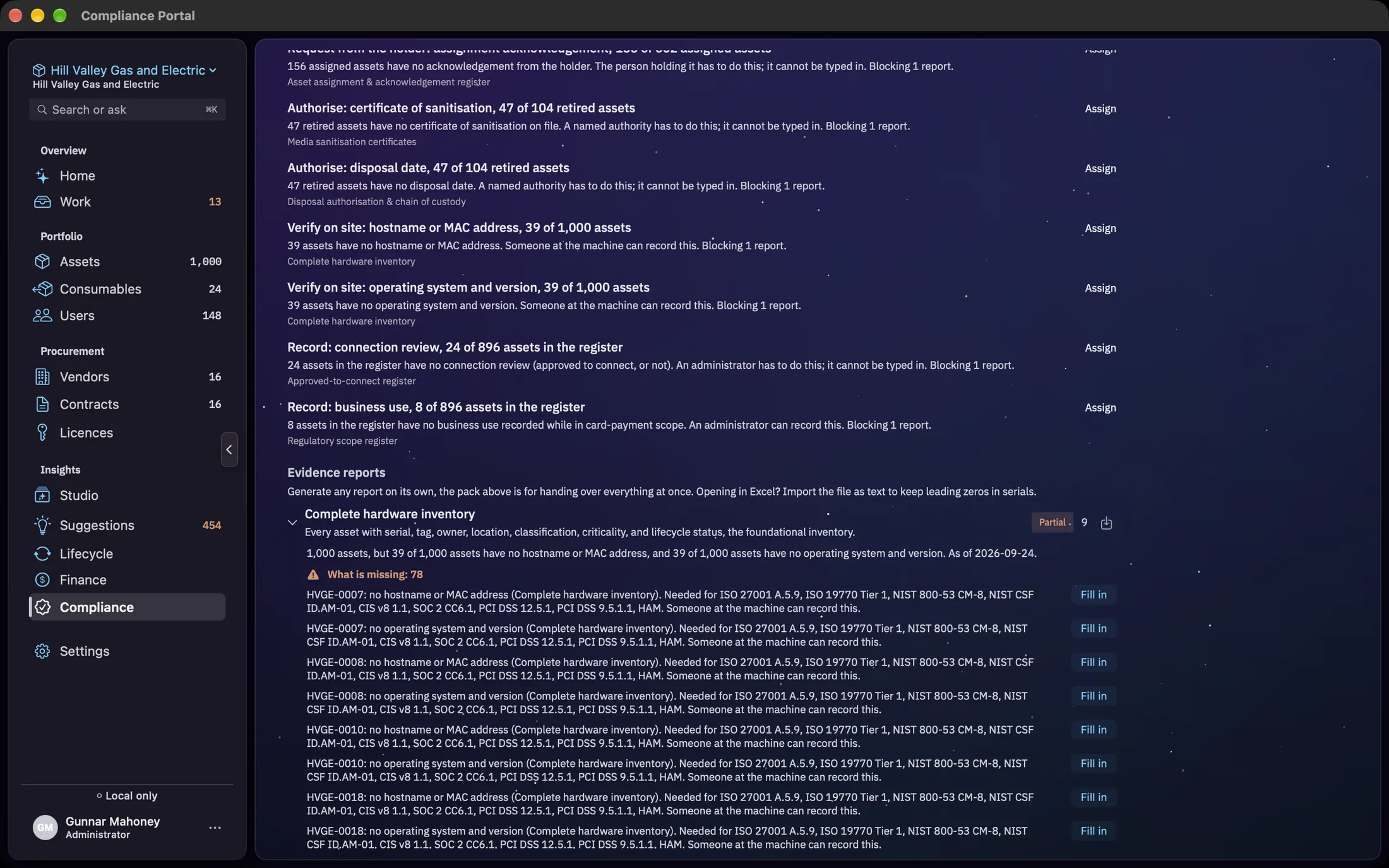
Every row shows the report title, a one-line purpose, a coverage badge and a count of the controls it satisfies. The download button at the end of the row generates that report alone. Clicking the row body expands it to show the derivation behind the badge in full, then every control the report maps to, listed as framework, control number and requirement. The badge is a one-word claim; the expansion is the arithmetic behind it.
| Report | What it holds, in the app’s own words |
|---|---|
| Complete Hardware Inventory | Every asset with serial, tag, owner, location, classification, criticality, and lifecycle status, the foundational inventory. |
| Asset Assignment & Acknowledgement Register | Who holds each asset, when it was assigned, and their acknowledgement of acceptable use / custody. |
| Media Sanitization Certificates | Per-disposed-asset NIST 800-88 record: method (Clear/Purge/Destroy), tool, operator, and verification. |
| Disposal Authorization & Chain of Custody | Disposal requests with an independent authorizer (segregation of duties) and custody transfer trail. |
| Overdue Physical Verification | Assets whose last physical verification is past policy. Proves inventory accuracy is maintained. |
| Unassigned / Orphaned Assets | Assets with no current owner or never assigned. Surfaces unauthorized / unaccounted-for hardware. |
| Audit Trail / Change History | The change log, what changed on each asset, by whom, and when, over a chosen period. |
| End-of-Life, Warranty & Refresh Forecast | Warranty expiry, end-of-life, and recommended refresh dates for lifecycle and budget planning. |
| Classification & Criticality Register | Each asset’s data classification and criticality tier, the basis for risk-based controls. |
| Regulatory Scope Register | Which assets are in scope for each regulation (CDE, ePHI, CUI, EU personal data), the basis for PCI scoping, HIPAA/GDPR data-mapping, and segmentation evidence. |
| Encryption & Recovery-Key Register | Per-asset encryption state, method, verification, and recovery-key escrow. Data-at-rest protection. |
| Acceptable-Use Policy Attestation | Each user’s acceptance of the acceptable-use policy (version, date). Distinct from device receipt. |
| Fixed-Asset & Capitalization Register | Capitalized vs. expensed assets with acquisition cost and useful life, the IT fixed-asset register. |
| Lost / Stolen Device Incident Register | Lost/stolen device incidents: type, dates, containment, and the data-at-risk determination. |
| Breach Notification Log | For incidents requiring notification: the regulatory deadline, rationale, and when notice was sent. |
| Approved-to-Connect Register | Whether each device in service is approved to connect, who decided and when. Separates known devices from unauthorised ones. |
When a report is saved the confirmation appears at the top of the list rather than the bottom. With sixteen reports the bottom of the card is below the fold, and a confirmation nobody scrolls to is the same as no confirmation. The message names the file, and how many rows it holds.
An empty report still saves. An auditor asking for the breach notification log is entitled to a file that says there were none, and a header-only CSV is that answer. The status line says Nothing on file to report out loud, so an empty file is never mistaken for a failed export.
Reading the coverage badge
Three states, plus an honest fourth for the moment before it knows.
- Ready. The population this report reads exists, and every field an auditor expects to find on that population is filled.
- Partial. The report generates, but the evidence behind it is absent or has holes. This is the honest answer for an empty register, and nothing is special-cased, the demo included.
- Planned. Not generated at all. This one is a fact about the report type rather than about your data: it means the generator has not been written. Every report in today’s catalogue generates, so nothing you own should read Planned.
- Checking. What the badge says before the first assessment lands. It is deliberately not a coverage. A badge that answers before it knows is worse than one that admits it does not.
What counts as filled depends on your frameworks. The Approved-to-Connect Register asks every device in service for a connection review. Other fields are asked only by the frameworks that name them: on the hardware inventory, an owner of record for CIS Controls and ISO 27001, a department and (on networked devices) a hostname or MAC address for CIS, a location for NIST 800-53 and PCI DSS, and the operating system and version for NIST 800-53; business use on machines in card-payment scope and end of support (on the asset or its product model) for PCI DSS; and the sanitisation tool, tool version and verification method for NIST 800-88.
Badges are re-derived whenever the register changes. The tables behind them are observed directly, so an import, an integration sync, an automation rule or a manual edit all cause a recomputation without any of those paths having to remember to ask. An import that commits in a burst is assessed once at the end of the burst rather than once per row.
If the register cannot be read the badges stay blank rather than falling back to something optimistic. From where you are sitting, a stale badge and a hardcoded one look identical.
What is missing, by name
Fill in the register and the reports fill themselves in. Wherever one is short, it says exactly what and where.
A report with gaps shows WHAT IS MISSING with a count when you expand its row. Each line names the asset, what it needs, the report, the controls in your programme that need it, and who can supply it, for example NT-0042: no operating system and version (Complete Hardware Inventory). Needed for NIST 800-53 CM-8, NIST CSF ID.AM-01, CIS v8 1.1, HAM. Someone at the machine can record this. A report with nothing on file at all says that instead.
- Fill in opens the asset in its editor, scrolled to the section that holds the missing field: Network for an operating system, Lifecycle for end of support, Assignment for an owner of record.
- Open is for evidence that is an act rather than a field, like a connection review, a physical verification or a disposal. The record opens with a Needed for compliance banner offering the act, for example Approve to Connect and Mark Not Approved. A scope review, a policy acceptance or an encryption check opens the editor section where the Mac records it. The link never does the act for you; a person still presses it.
The list shows the first 25 gaps and then And 12 more, listed in MISSING.txt in the evidence pack. The pack carries every one.
The list and the badge come from the same check, so a report can’t read Partial with nothing listed, or list a gap on a report that reads Ready. The programme updates as soon as the profile or the product catalogue changes.
The audit evidence pack
One file, when the auditor asks for everything.
Generate audit evidence pack opens a save panel and writes a zip holding the full inventory, the audit trail, the sanitization certificates and the worklists, along with a manifest mapping every artifact to the controls it answers. The manifest is the part that matters: it turns a folder into an index, so you are handing over an answer rather than a pile.
Two files are worth knowing by name. MISSING.txt, at the top of the zip, lists every piece of evidence still missing, grouped by report, in words an auditor and the person fixing it can both follow. When nothing is missing it says so. connection-review.csv is the Approved-to-Connect Register: every device in service, whether it is approved to connect, who decided and when.
While the pack assembles, the card carries a spinner. When it lands, a status line names the file. If it fails, the same line carries the error rather than a dialog you have to dismiss before reading it.
Drawing an audit sample
A draw an auditor can re-run and get the same machines.
Draw Audit Sample… sits beside the pack button and opens a sheet with three controls: a sample size between 1 and 500, a scope, and a seed.
- Scope narrows the population before the draw: All active assets, In cardholder data environment, Holds ePHI, Holds EU personal data or Encrypted devices.
- Population in scope shows how many assets the current scope matches, so you can see the draw is against the fleet you meant before you make it.
- Seed makes the draw reproducible. The same seed against the same population gives the same sample, to you and to them.
Draw & Save… writes two files: the sample as a CSV, and a manifest beside it recording the seed and the population. The manifest is what makes the draw checkable. Without it the CSV is a list of machines with no account of how they were chosen, which is exactly the thing sampling is supposed to rule out.
Open incidents
A lost or stolen machine appears here, with its deadline, until somebody closes it.
Each row carries the asset tag, the incident type and the status. Where a breach notification is required and none has been recorded, the row also carries the deadline, which is why this card sits on the portal rather than inside the asset record. Clicking a row opens the investigation; Close closes the incident.
The investigation holds the facts, the data-at-risk determination, the breach notification determination, the response timeline and the resolution notes. The asset tag in its header is a button that takes you to the machine in Assets. The determinations arrive pre-filled from the asset’s regulatory scope and encryption state, with Re-run suggestion from asset scope to derive them again if the asset has changed since. The suggestion is a suggestion: the toggles are yours, and the rationale field is where you say why.
Closing an incident does not record a notification. They are separate acts, and a closure with no notification date is recorded as exactly that. The breach notification log exports what was recorded, so a file shipping inside an evidence pack never asserts a regulatory action nobody performed.
What it will not do
The deliberate gaps, because an auditor will find them anyway and it is better that you know first.
- It does not send anything. Every artifact is written to a file you choose. Nothing leaves the Mac as part of producing evidence.
- It does not make the breach determination. Scope and encryption produce a suggestion; the toggles and the rationale are yours, and the rationale is what gets read.
- It does not scan machines. Encryption state, classification and regulatory scope are fields on the record, filled by you or by an integration. Nothing here inspects a device to find out.
- It does not claim coverage it cannot show. A report with no evidence on file reads Partial, in your register and in the demo alike.