DocumentationiPhone
Work
Work keeps jobs and requests together in one list, each with a number you can say across a room, like JOB-0001 or REQ-0001. Raise one on the spot, hand it out, and see it through.
- For
- Jobs somebody has to do and kit somebody has asked for, in one numbered list you can raise, assign, claim, report and check from the phone.
- Will not
- Checking a report says somebody read it. It doesn't verify any machine. A request isn't assigned to anybody: it waits on whoever keeps the register.
- Writes
- Raising, claiming, reporting done and checking are each recorded with who did it and when. Done work keeps its number as history.
One list, five chips
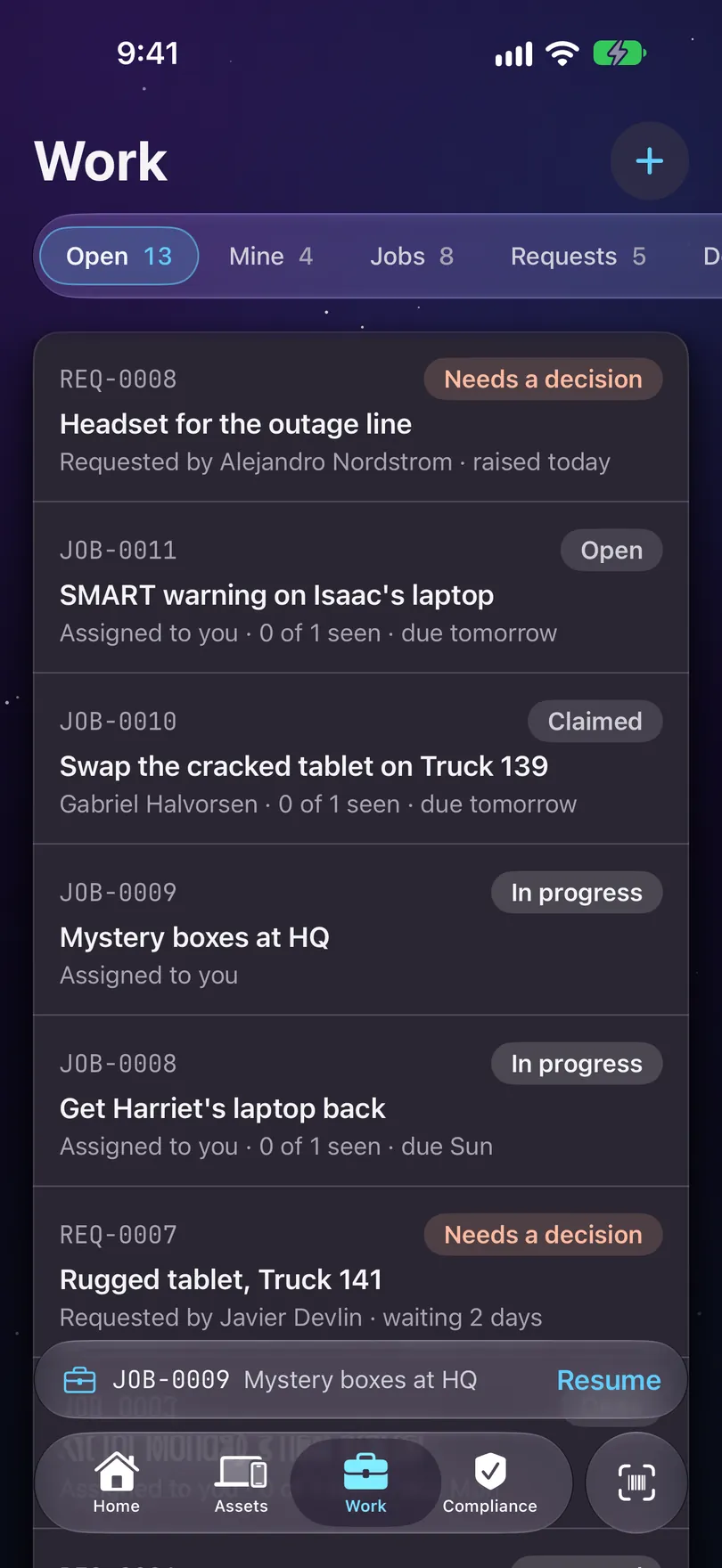
Chips along the top cut the list. Each chip's count and the list it opens are always the same number.
- Open: every job and request still asking for something.
- Mine: jobs in your hands, the ones you’ve claimed and the ones given to you that nobody has claimed yet. Requests are never Mine, because a request isn’t addressed to anybody.
- Jobs and Requests: one kind each.
- Done: reported, cancelled, issued, declined or withdrawn. Nothing drops off the end: done work stays, with its number.
On Home, the Jobs and Requests rows count the same lists and open Work on the matching chip.
The numbers
JOB-0001 and REQ-0001: something a person can say out loud, in a queue you can find it in.
Jobs and requests each have their own run of numbers, per organisation, and a number is never handed out twice. The number is a label for people. It isn’t what the app uses to tell tickets apart, so two devices can never mix one up with another.
A phone that works off a Mac or Starkive Cloud numbers tickets from a block of numbers it has been given. If it has none left, the ticket is still recorded, and it gets its number when it reaches the Mac or the cloud.
Raising a job or a request
Tap + on Work. The sheet asks which one first, because they ask different questions.
Pick Job or Request
A job is work somebody has to do, like sweeping a room or taking a delivery in. A request is kit somebody has asked for, like a laptop for a new starter.
For a job: what, which assets, and who
What needs doing takes a short title and a kind: a sweep, taking machines in, photographing, or anything else. Covers says which assets it’s about. Assign to gives it to the team, to a person, or to a device, and only lists people and devices this register has seen. A due date is optional. A job past its date is late, not undone.
For a request: what, who for, and why
What is being asked for, Who it is for (leave it on the team if nobody in particular is waiting), and an optional Why it is needed, which whoever approves it will see.
Create it
The button names the number the ticket will carry when this phone has one to give, like Create JOB-0012 or Raise REQ-0007. Otherwise it reads Create job or Raise request.
Seeing a job through
Claim it, do it, report it done, and have someone else check it.
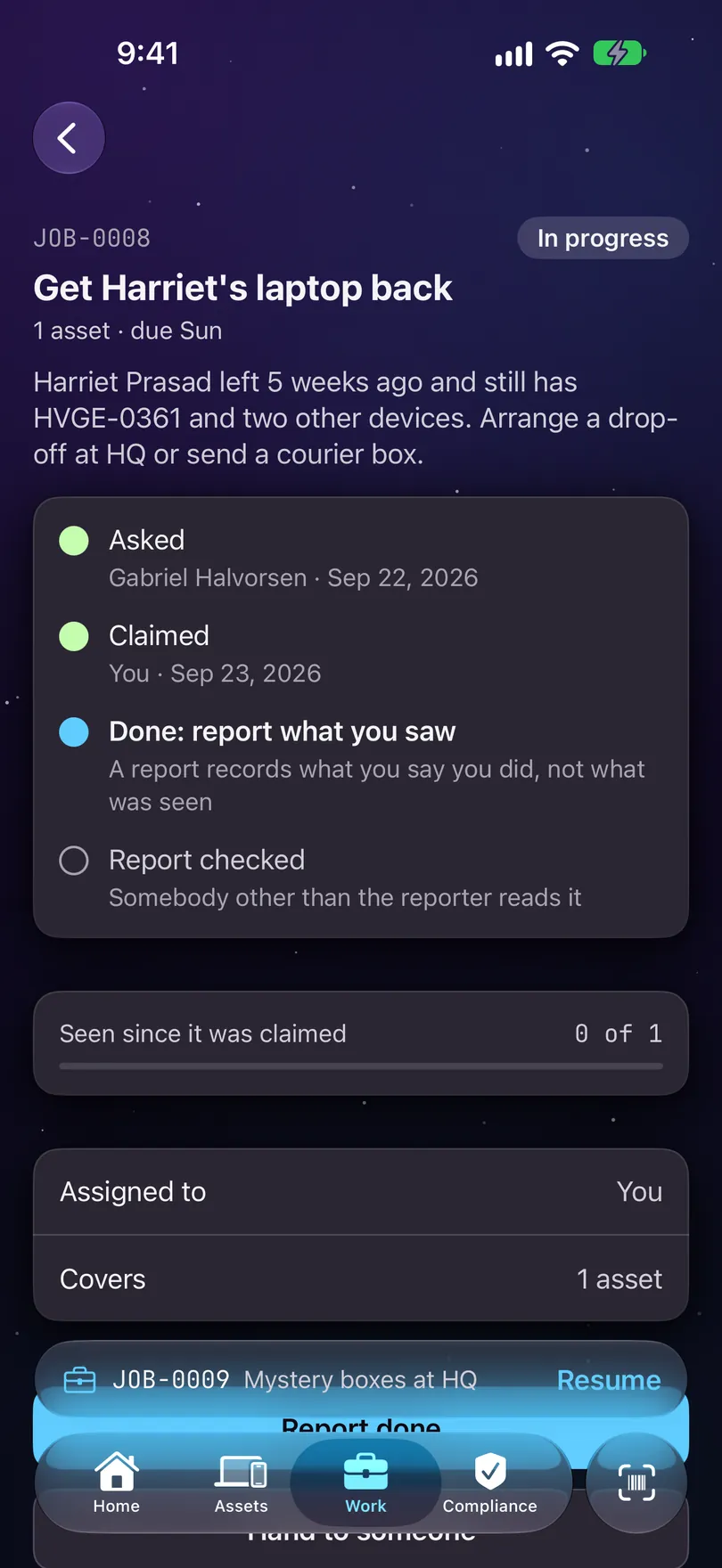
A job shows its four steps in order, each with who and when: Asked, Claimed, Reported done and Report checked. A due date, if it has one, sits under the title, like due Sun.
Claim
A job given to the team is open to anybody, and the first to claim it takes it. A job given to you is yours to claim. Whoever holds a job can hand it to someone else.
Do the work
The job’s button takes you to it: Continue scanning for a sweep, Take one in for intake, Photograph, or Open.
Report done
Report done says you finished. The job moves to Done and keeps its number.
Someone else checks it
Check the report is offered to anybody except the person who reported it, because a check by the reporter is the reporter agreeing with themselves. The screen says what a check means: you read the report. It doesn’t verify any machine. The job keeps who checked it and when, and the card reads checked by with their name.
On iOS 26.1 and later, the job you’re on sits just above the tab bar on every screen, so you can get back to it. On earlier versions, Work’s own list is the way back.
Requests
Open a request to see who asked, who decided, and what was handed out.
History lists what happened, with who and when: Raised, then Approved, Declined or Withdrawn, then Issued. A note left with the decision shows under it. Once something is issued, What was issued shows the machine, and tapping it opens the record.
The buttons follow where the request is: Approve, Fulfil: record what was issued, Decline and Withdraw it. Declining or withdrawing asks first, with Keep it open to back out.